
Registered Training Organisations (RTOs) have very specific auditing and compliance requirements. Not only do you have to submit an Annual Declaration of Compliance (ADC), but about every five years you must undergo a re-registration audit by ASQA. If you have not stayed on top of all your compliance requirements you may be in for some surprises when the regulator conducts your Performance Assessment.
eSMART has been developed by a qualified auditor with extensive ASQA compliance experience.
The eSMART system is based on risk model so you know your risk level at all times
eSMART has a smart algorithm that translates hundreds of compliance evaluation points into a single percentage
The eRiskWatch dashboard provides the precise metrics you need to make informed decisions about compliance.
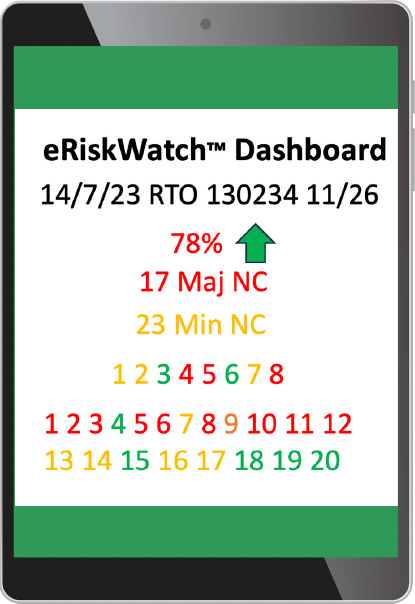
The eRiskWatch dashboard provides the actionable information. The sample above shows:
78% – this is your current level of ASQA compliance
Green “up” arrow – this shows that your compliance level is trending upwards over the past 30 days
17 Maj NC – This lets you know you currently have 17 major non-compliances
23 Min NC – This lets you know you currently have 23 minor non-compliances
Numbers 1 2 3 4 5 6 7 8: These are traffic-light colour coded compliance indicators for each of the 8 RTO Standards. Red indicates major non-compliance, yellow indicates a minor non-compliance and green indicates full compliance
The number 1-20 indicate the previous number of months and the level of compliance for each month.
You can drill down into every metric to review specific non-compliances. This enables you to take immediate action to rectify and non-compliances.
eSMART allows you to search compliance levels by a range of different categories, including:
eSMART and eRiskWatch™ enable you to manage compliance like you've never managed it before - easily and in real time.

©eSmart 2026